ABS Bed Adhesion Solutions — Stop Warping and Failed Prints

ABS warping is one of the most frustrating problems in 3D printing. You’ve spent hours on a print only to find the corners lifting and the entire part warping. This guide provides proven solutions to achieve perfect ABS bed adhesion every time.

ABS Bed Adhesion Solutions — Stop Warping and Failed Prints

Understanding Why ABS Warps

ABS undergoes significant thermal contraction when cooling. As upper layers cool and shrink, they pull on lower layers. If the bottom layer isn’t firmly attached to the build plate, this force causes corners to lift.

The key factors causing warping:

1. Temperature differential — Large difference between hot filament and ambient air
2. Insufficient bed adhesion — First layer doesn’t bond adequately
3. Drafts — Uneven cooling causes localized warping
4. First layer issues — Too high, too low, or uneven

Understanding ABS material properties helps identify appropriate solutions.
ABS Bed Adhesion Solutions — Stop Warping and Failed Prints - solutions

Enclosure: The Foundation of Success

An enclosure is non-negotiable for ABS printing. It maintains ambient temperature around 40-50°C, reducing thermal stress.

Enclosure Types

Type التحكم في درجة الحرارة Cost Effectiveness
DIY Box Moderate منخفضة جيد
Purpose-built ممتاز عالية ممتاز
Modified printer جيد متوسط جيد جداً

Enclosure Tips

  • Add foam insulation for better temperature retention
  • Install a small fan for air circulation
  • Monitor temperature with a thermometer
  • Allow 10-15 minutes for temperature stabilization
ABS Bed Adhesion Solutions — Stop Warping and Failed Prints - results

Bed Surface Solutions

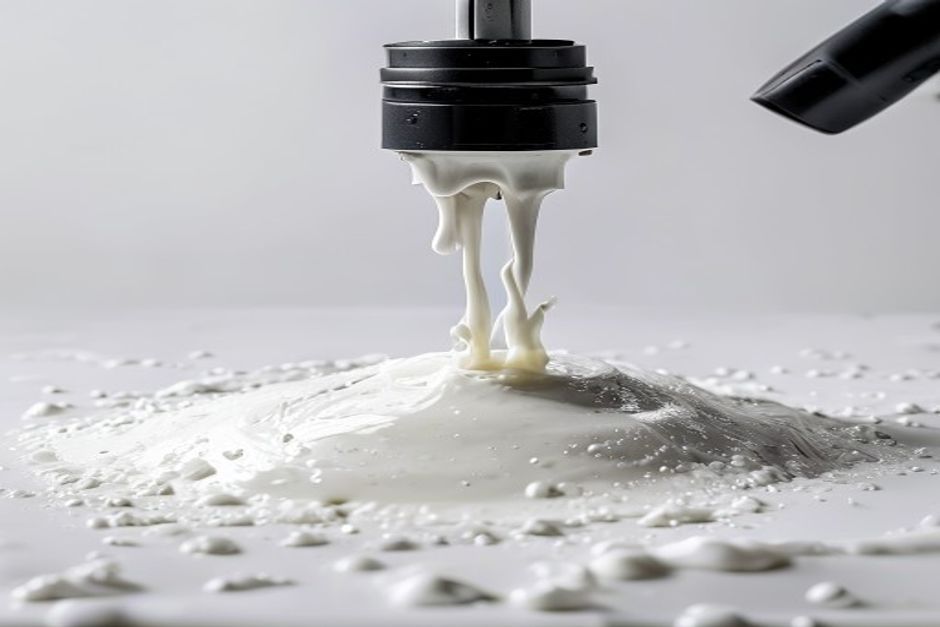
ABS Slurry

The most effective and economical solution:

Recipe:

  • Small ABS scraps or failed prints
  • Acetone (100% pure)
  • Glass jar with lid

Instructions:
1. Add ABS pieces to jar
2. Cover with acetone
3. Let dissolve overnight
4. Stir before use
5. Apply thin layer to heated bed
6. Allow acetone to evaporate (2-3 minutes)

Production environments often prefer this for cost-effectiveness.

PEI Sheet

Polyetherimide (PEI) provides excellent ABS adhesion:

  • Clean with isopropyl alcohol before each print
  • Light sanding when adhesion decreases
  • Temperature: 100-110°C

BuildTak and Similar

Specialized surfaces designed for ABS:

  • No additional adhesive needed
  • Replace when worn
  • Follow manufacturer temperature recommendations

First Layer Settings

Temperature Settings

  • Nozzle: First layer 5-10°C higher than normal
  • Bed: 100-110°C for glass, 90-100°C for PEI
  • Cooling: Fan off for first layer, minimal after

Speed and Height

  • Speed: 50-60% of normal printing speed
  • Layer height: 0.2-0.3mm for better squish
  • Flow: 100-105% for solid first layer

Z-Offset Calibration

Proper Z-offset is critical:

  • First layer should be slightly squished
  • Lines should merge without gaps
  • No ripples or ridges

Environmental Control

Draft Prevention

  • Close all windows and doors
  • Avoid air conditioning vents
  • Consider printer location carefully
  • Use draft shields in slicer settings

Ambient Temperature

  • Minimum 25°C room temperature
  • Enclosure should reach 40-50°C
  • Avoid opening enclosure during print

Brim and Raft Options

Brim Settings

A brim provides additional anchoring:

  • Width: 5-10mm
  • Line count: 4-8 lines
  • Distance: 0mm (attached)
  • Remove after printing

Raft When Necessary

For challenging geometries:

  • Raft offset: 3-5mm
  • Air gap: 0.2-0.3mm
  • Base layer speed: reduced

Unlike flexible materials, ABS benefits significantly from rafts.
Frequently Asked Questions

Why do corners lift first?
Corners have the least surface area and highest stress concentration.

Can I print ABS without an enclosure?
Small parts might succeed, but larger prints will almost certainly warp.

How often should I apply ABS slurry?
Reapply when prints start lifting, typically every 5-10 prints.

Frequently Asked Questions

Why is my print quality inconsistent?
Multiple factors affect quality: temperature stability, filament quality, and machine calibration. Test systematically.

How can I improve my print success rate?
Start with proper calibration, quality filament, and appropriate settings for each material.

What maintenance does my printer need?
Regular nozzle cleaning, belt tensioning, and lubrication of moving parts.

Frequently Asked Questions

Q: What causes ABS warping on the print bed?

ABS warping is caused by thermal shrinkage as the plastic cools. The outer edges of the print contract more than the centre, lifting the corners and causing the print to detach. To minimise this, use a heated bed at 95-110 deg C, apply adhesion promoters like ABS slurry or hairspray, and maintain a warm ambient temperature of 30-45 deg C in the build chamber.

Q: What is ABS slurry and how do you make it?

ABS slurry is a mixture of ABS plastic dissolved in acetone that creates a sticky coating on the print bed. To make it: dissolve small pieces of ABS filament in 100% acetone until you get a milk-white consistency (similar to syrup). Apply a thin layer to the clean print surface before printing. Allow it to dry until it becomes tacky before starting the print.

Q: What bed surface works best for ABS printing?

Glass with ABS slurry or hairspray is the most reliable surface for ABS. PEI sheets also work well with ABS. Avoid BuildTak at high temperatures as it can degrade. A textured PC sheet provides excellent adhesion for ABS without any adhesive. The key is ensuring the first layer adheres firmly without being so sticky that it damages the print upon removal.

Q: How does enclosure temperature affect ABS warping?

Maintaining a consistent chamber temperature of 30-45 deg C dramatically reduces ABS warping by minimising temperature differentials between the hot top layers and cooler base layers. An enclosed printer with a heated chamber significantly reduces warping, even for large prints.

Q: What is the difference between brim and raft for ABS?

Brim adds a flat skirt around the print to increase surface contact with the bed, reducing edge warping. Raft creates a full foundation below the print, completely isolating the model from the build plate. Brim is preferred for most prints; use raft only for extremely warped parts or prints with very small footprints.

Q: Why does ABS stick too firmly to the bed?

Over-adhesion happens when the first layer is printed too close to the bed or when the adhesion promoter is applied too thickly. Use a raft or apply a thinner layer of ABS slurry. Let the bed cool to room temperature before removal – never force a hot print off the bed as this can tear the build surface.

Q: What nozzle temperature prevents ABS warping?

ABS warping is not primarily a temperature issue but a cooling issue. Maintain nozzle temperature at 230-260 deg C. More important is preventing rapid cooling: use part cooling fan at 0-10% only after layer 3, and keep the chamber warm.

Q: Can ABS be printed on a cold bed?

No. ABS requires a heated bed at 95-110 deg C to maintain sufficient bottom layer temperature and prevent warping. Printing ABS on a cold or poorly heated bed will result in immediate delamination and warping. The heated bed is non-negotiable for reliable ABS printing.

Q: What print speed reduces ABS warping?

Slower print speeds (30-50mm/s for perimeters, 50-70mm/s for infill) improve inter-layer bonding and reduce internal stresses that contribute to warping. On the first layer, use 15-20mm/s for maximum bed adhesion.

Q: How do I clean my print bed after ABS printing?

For glass beds with ABS slurry, scrape off the residue with a razor blade and clean with acetone or isopropyl alcohol. For PEI sheets, heat the bed to 60 deg C, then carefully peel off the print. Avoid abrasive cleaners on PEI.

دعنا نصمم لك الحل المخصص لك

هذا الحقل مطلوب.
هذا الحقل مطلوب.
هذا الحقل مطلوب.
هذا الحقل مطلوب.
انتقل إلى الأعلى